Part Names and Functions
Front Panel| Rear Panel
Note
The design of the product is subject to change without notice and may differ from the illustrations depending on your product.
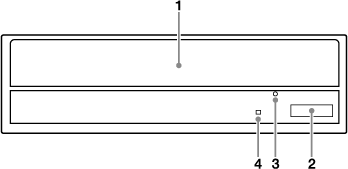
- Disc Tray
Load a disc here.
For details about a compatible disc types, see "Compatible Discs".
- Eject Button
Press to open and close the disc tray.
- Emergency Eject Hole
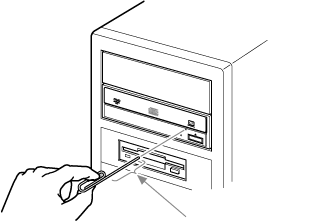
If the tray does not open with the Eject button, turn the PC off and insert a thin tool (such as a straightened paper clip) into this hole to eject the tray manually.
-
CAUTION
Depending on the product you are using, the Emergency Eject Hole may be in a different location than illustrated above.
- Busy Indicator
Indicates the drive status.
|
Lighting
|
- Load/Eject
- Drive read
- Data transfer during FW update
- Access (seek)
|
|
Blinking
|
- Track at once recording
- Format
- Erasing data
- Writing data
- CD packet write, read (audio play)
|
|
Off
|
The drive is in a state other than those outlined above.
|
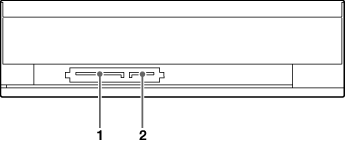
- Serial ATA power connector
Connect to the Serial ATA power cable of the computer.
- Serial ATA connector
Connect to the computer with the Serial ATA data cable.