1. The WAN configuration page allow user to set the configuration
for the WAN/ADSL ports.
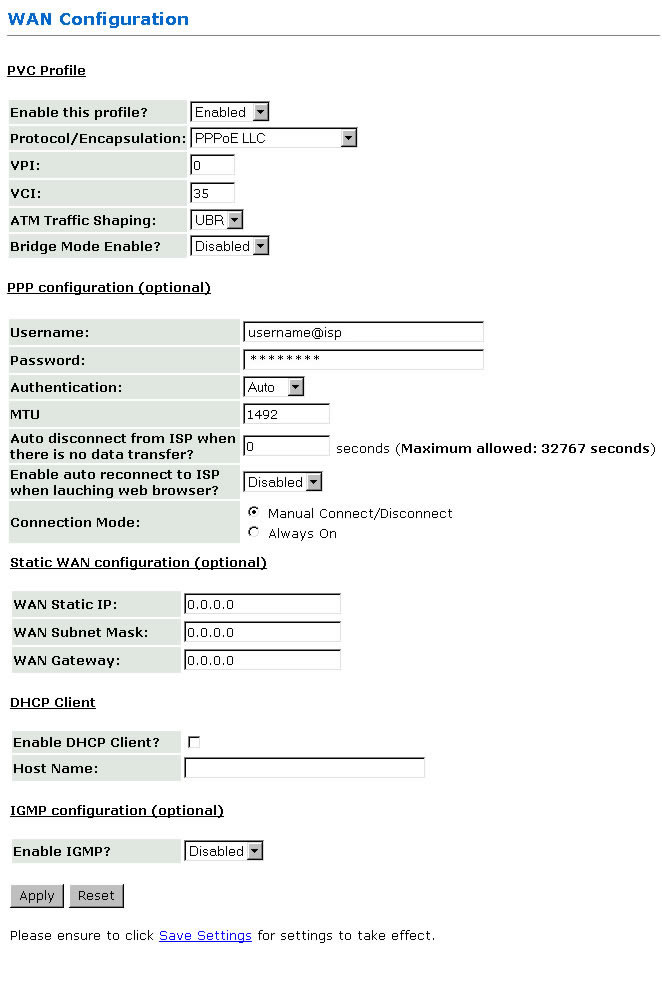
2. Under WAN Configuration, it provides the
configurations for IP address and VPI/VCI.
3. PVC Profile:
This section let you configure the PVC settings.
- Protocol/Encapsulation:
Select the type of data link for your router. Check with your Internet Service
Provider.
- VPI:
Virtual Path Identifier. Enter the given value by your Internet Service Provider.
- VCI:
Virtual Circuit Identifier. Enter the given value by your Internet Service
Provider.
4. Encapsulation:
Choose accordingly to your configuration.
5. PPP (Optional)
Note:If user chose
RFC1483 or RFC 1577 configuration please ignore PPP entry.
- Username:
If PPP type of encapsulation is setup, you may need to enter the username
given by your Internet Service Provider.
- Password:
If PPP type of encapsulation is setup, you may need to enter the password
given by your Internet Service Provider.
- Authentication:
When Auto option is chosen, the PAP mode will run first then Chap.
- Auto reconnect
when ADSL link down?:
When it is checked, it will maintain the PPP connection all time until you
manual disconnect the PPP connection.
6.
Static WAN Configuration (optional): This section let you configure
Static WAN settings. (note: This is applicable to 1483 Routed
and Classical IP over ATM protocol/encapsulation).
- WAN Static IP:
Enter the static IP address assigned by your Internet Service Provider.
- WAN Subnet Mask:
Enter the subnet mask address given by your Internet Service Provider.
- WAN Gateway:
Enter the WAN Gateway IP address given by your Internet Service Provider.
7. DHCP Client (Optional)
- Enable DHCP Client:
Select to enable DHCP Client.
- Host Name:
Enter the Host here.
8. Click Save Settings
for settings to take effect.